PKHeX
Free Pokémon Save Editor — Online & Desktop
Open your Pokémon save and start editing in seconds. Change any Pokémon's stats, moves, or shininess, verify legality instantly, and export — free, no signup, and compatible with every generation from Game Boy to Nintendo Switch.
What is PKHeX?
PKHeX is a free, open-source save editor for the core Pokémon series, from the Game Boy Advance titles to Scarlet/Violet on Switch. Load your decrypted save file and edit everything: Pokémon data, items, Pokédex progress, trainer info, and event flags.
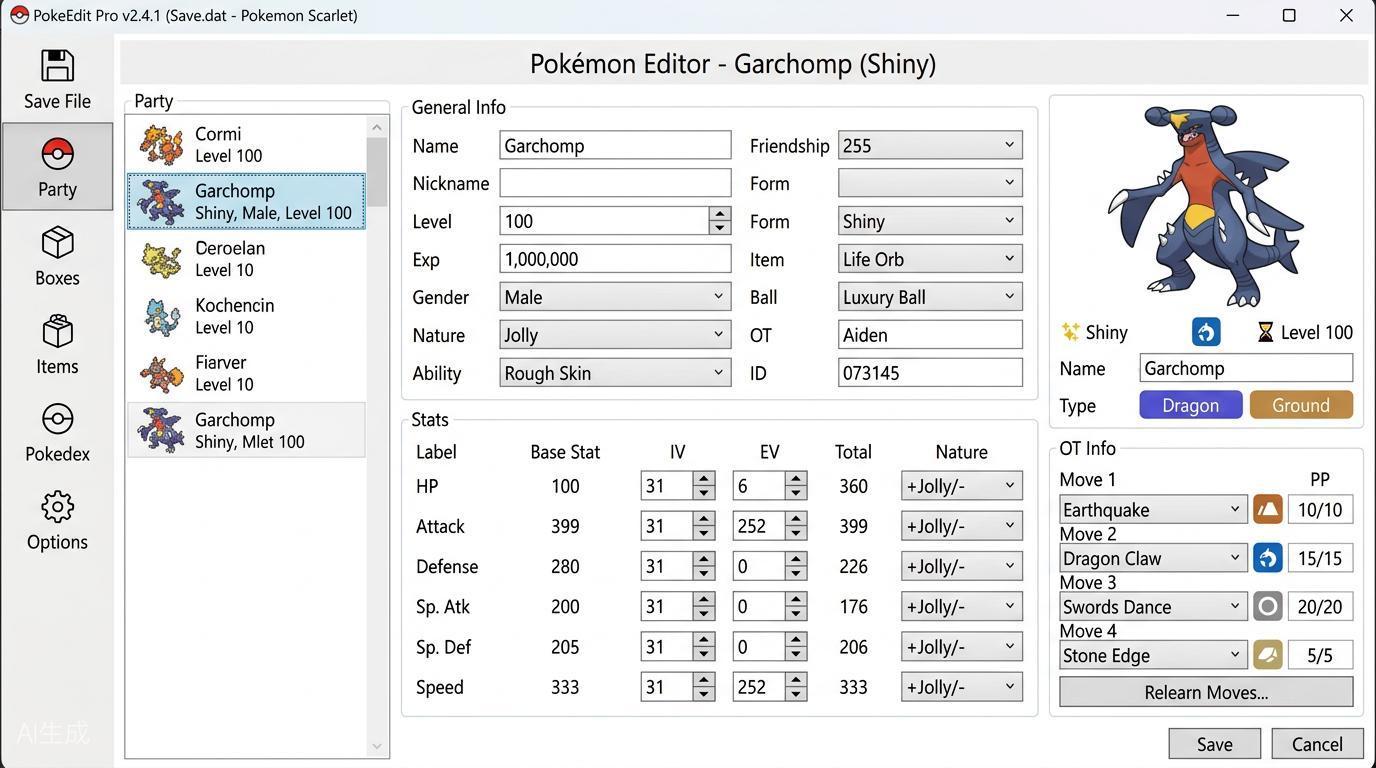
Edit Any Pokémon Detail
Change species, form, nature, ability, IVs/EVs, moves, shininess, Poké Ball, ribbons, and memories in a couple of clicks.
Cross-Generation Transfers
Move Pokémon from older games into newer ones — PKHeX converts the file format automatically along the way.
Mystery Gift Injection
Import Wonder Card files (.wc*) to claim official event distributions you missed, straight into your save.
How to Edit a Pokémon Save with PKHeX
All you need is your decrypted save file. Console players dump it with a save manager such as Checkpoint or JKSM; emulator players can open the .sav file directly. The whole edit takes three steps:
Export Your Save File
On 3DS or Switch, dump the save with Checkpoint, JKSM, or SaveDataFiler. Emulator players can use the .sav or .dsv file directly. Encrypted backups from devices like Powersaves are not supported.
Edit Pokémon, Items & Trainer Data
Open the save in PKHeX and change anything: build a competitive team by pasting a Pokémon Showdown set, complete your Pokédex, or add items to your bag.
Check Legality & Import Back
PKHeX flags illegal edits instantly with its built-in legality checker. Fix any warnings, save the file, and restore it to your console or emulator to keep playing.
What You Can Do with PKHeX
A complete toolkit for viewing, editing, and verifying Pokémon saves across every generation.
Instant Legality Checker
Every Pokémon is validated against real encounter data, so you know right away whether it can be traded or used in online battles.
Showdown Sets & QR Codes
Paste a Pokémon Showdown set to build it instantly, or export QR codes to share teams with friends.
Batch Editor
Modify hundreds of Pokémon at once with simple commands — ideal for organizing living dexes or mass-editing boxes.
Mystery Gift Database
Browse official event distributions, inject them into your save, and manage the received-gift list.
Encounter Database
Look up where any Pokémon can be caught in each game and generate a fully legal specimen from that data.
Automatic Backups
Create a 'bak' folder next to PKHeX and every save you open is backed up with a timestamp before you change anything.
PKHeX Frequently Asked Questions
Answers to the questions trainers ask most before editing their first save.
Why won't PKHeX open my save file?
PKHeX only reads decrypted saves. Backups made with Powersaves or Sky3DS stay encrypted and cannot be opened. Dump the save from your console with Checkpoint, JKSM, or SaveDataFiler, or use the raw .sav file from your emulator.
Can Pokémon edited with PKHeX be traded or used online?
Pokémon that pass the legality checker behave like legitimately obtained ones. Never trade or battle with significantly hacked Pokémon without the other player knowing — it can ruin their game and risk penalties on your account.
PKHeX vs PkSM — which one should I use?
PKHeX runs on Windows (or in your browser with PKHeX Online) and offers the deepest editing tools and the most accurate legality checks. PkSM runs directly on a hacked 3DS. Many players use PKHeX for editing and PkSM for quick on-console changes.
Does PKHeX work on Mac or Linux?
The desktop app is built for Windows, but macOS and Linux users can run it through Wine or Mono. Alternatively, use PKHeX Online in any modern browser — no installation required.
Which Pokémon games does PKHeX support?
Every core-series title: Gen 1–2 battery saves, GBA and DS games, all 3DS titles (X/Y, ORAS, Sun/Moon, USUM), Switch games (Let's Go, Sword/Shield, BDSP, Legends: Arceus, Scarlet/Violet), and the GameCube games Colosseum and XD.
What file formats can PKHeX open?
Save files (main, .sav, .dsv, .dat, .gci, .bin), GameCube memory cards (.raw, .bin), individual Pokémon files (.pk*, .pb7, .ck3, .xk3, .sk2, .bk4), Mystery Gift files (.pgt, .pcd, .pgf, .wc*), and GO Park entities (.gp1).
Will editing my save get my account banned?
Editing a save on its own does not trigger bans, but using illegal or obviously hacked Pokémon in online play can lead to restrictions. Always run the legality checker, keep your edits plausible, and back up your original save first.